Instagram brings Edits to Mac with an AI-agent workflow
Instagram announced Edits for Mac, a free macOS video-editing app with a workflow that lets an agent use Edits tools to build a rough cut.
Key takeaways · 4
- 01
Edits Desktop is free, available on macOS, and requires an M1-or-later Apple-silicon Mac plus an Instagram sign-in.
- 02
Its MCP gives agents access to Edits Desktop tools; a project created by an agent can be opened in Edits for further editing.
- 03
Creators can move between agent-led and manual editing, but cannot yet edit the same project across mobile and desktop.
- 04
The desktop editor supports watermark-free 4K exports and direct publishing to Instagram with tagging and location features.
A Mac editor with an agent connection
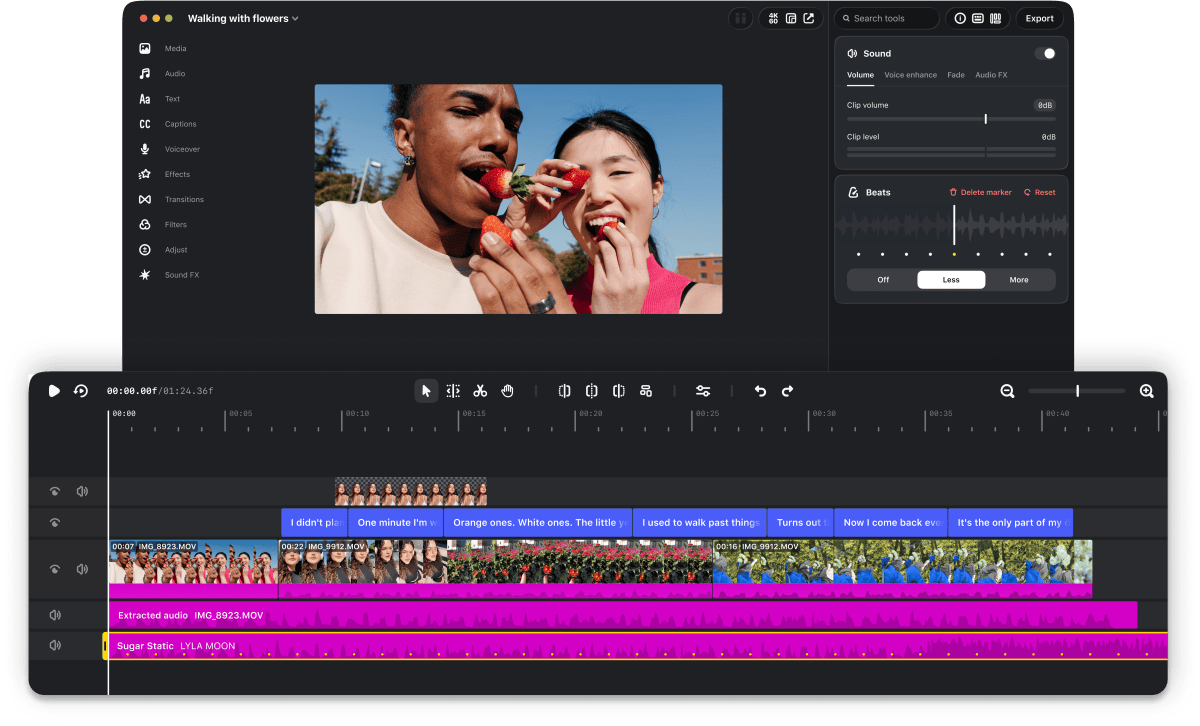
Instagram announced Edits for Mac on a Thursday, and the app is available as free macOS software.[1][3] Edits Desktop is releasing an MCP for its tools, allowing an agent to interact with the editor.[2] In the example workflow reported by The Verge, a user asks Muse to use the Edits MCP to make a rough cut of a video in the downloads folder.[2] The resulting project file can then be opened in Edits for further work, and creators can alternate between agentic and manual editing.[2]
Tools for detailed desktop editing
Instagram says the desktop version is designed for more complex video projects that benefit from a larger screen, mouse, and keyboard.[1] Edits Desktop has a multi-track timeline, transition keyframes, and audio waveforms for accurate cuts.[1] It also includes color wheels, log conversions, and curves for grading video.[4] Creators can customize keyboard shortcuts or import them from other editing software.[1] The app includes licensed and royalty-free music, sound and video effects, automatic captions in multiple languages, and saved audio and text styles from the mobile app.[1] Users can also import their own font files.[1]
Publishing and platform limits
Edits supports horizontal and vertical video, and offers watermark-free exports in 4K resolution.[1] Creators can publish directly from the desktop editor to Instagram, where tagging and location features are built in.[1] The current release is for macOS, not Windows or Linux, and requires an Apple-silicon Mac with an M1 chip or later.[2][3] Users must sign in with an Instagram account.[3] One important workflow limit is that the same project cannot yet be edited across Edits on mobile and desktop.[2] Meta says it is working on cross-platform editing and plans weekly updates to the desktop app.[2]
A broader editing push
Meta CEO Mark Zuckerberg said Edits had more than 50 million active users.[4] The desktop release puts Edits in more direct competition with ByteDance’s CapCut, which Meta sought to challenge when it launched Edits.[1] Instagram had added an AI creative assistant to the mobile app in September; it offers video suggestions and feedback using Instagram account data and metrics such as views and retention.[2] The desktop MCP workflow is a different capability: it gives an agent a way to work with Edits tools on a project.[2] For teams evaluating it, the immediate practical question is whether a Mac-based workflow and the current mobile-desktop project boundary fit their editing process.
The release gives video teams a way to test agent-assisted rough cuts inside a desktop editor while keeping room for manual edits. Before planning a broader workflow, teams should weigh the Mac-only requirement and the current inability to move the same project between mobile and desktop.
Why it matters
Bring this to your team — one session a day, built for your industry.
kju.ai is built for teams: daily sessions, team analytics, and rollout support for your organization.
For teamsHow this developed
7 November 2026
Instagram brings Edits to Mac with an AI-agent workflow
Sources
- Instagram brings Edits to desktop to take on CapCut | TechCrunchtechcrunch.com
- You can edit your videos with AI on Instagram’s new desktop Edits app | The Vergetheverge.com
- Instagram’s Edits for Mac Lets AI Agents Build Rough Cuts – Unite.AIunite.ai
- Instagram's Edits Is Now On Desktop As A Mac Appengadget.com