Apple adds $49.99 usage packs to Logic Pro
Apple has added a one-time “Buy More Usage” purchase option to Logic Pro for users who reach limits on certain Apple Intelligence features. The purchase costs $49.99, and Apple says additional usage is account-specific and expires after 12 months.
Key takeaways · 4
- 01
Logic Pro users can find the purchase option under Intelligence Features > Show Usage in the app’s main menu.
- 02
The $49.99 purchase is one-time, not a subscription, and unused additional usage rolls over monthly before expiring 12 months after purchase.
- 03
Packs are tied to the Apple Account that buys them, and Apple does not support Family Sharing for them.
- 04
Check the assistant’s device, operating-system and language requirements before planning a Logic Pro workflow around it.
What Apple has added
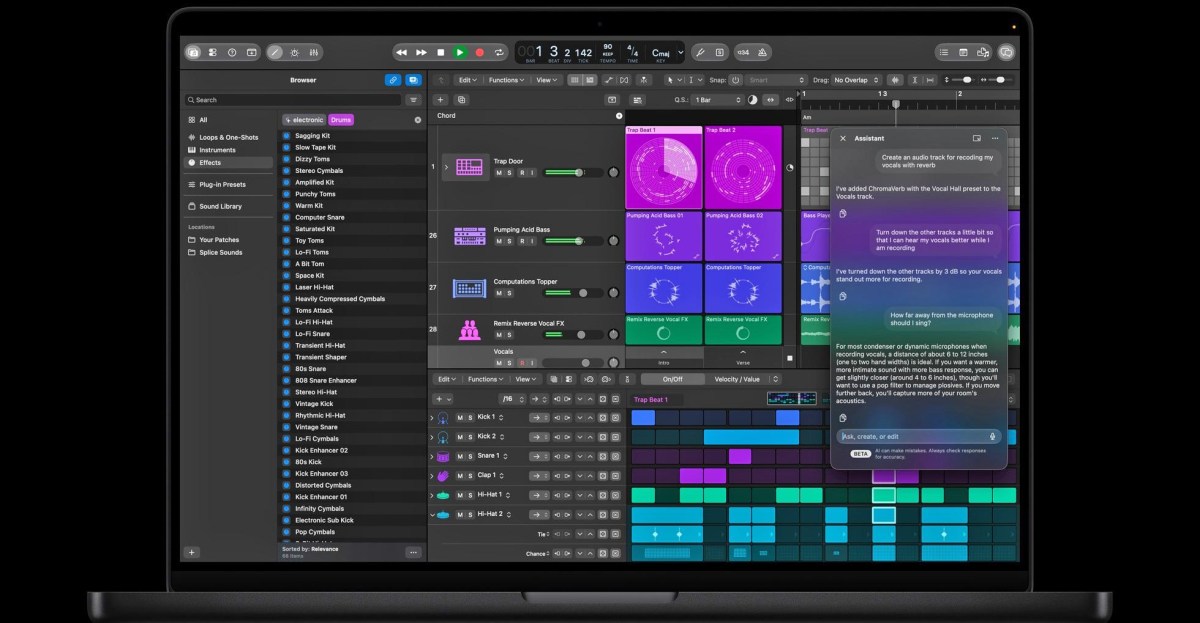
Apple added a “Buy More Usage” option to Logic Pro, priced at $49.99 for a one-time purchase.[1] Apple says packs let users continue using certain Apple Intelligence features after they hit usage limits.[1] Logic Pro’s assistant can help users start a song, set up a vocal track from a prompt or refine a project.[1] Apple says the limit for Logic Pro depends on the complexity of a user’s conversations with the assistant.[1] That means the amount of additional usage a user needs may vary with how they use the assistant.
How usage and expiry work
Additional usage is used only after a user reaches the monthly limit for a relevant feature, according to Apple.[2] Unused additional usage rolls over from month to month, but expires 12 months after purchase.[1] A pack can be used only by the Apple Account that purchased it, and Apple does not support Family Sharing for usage packs.[1] 9to5Mac notes that the packs are one-time purchases rather than subscriptions, unlike many other AI offerings.[2] Teams should account for the individual-account restriction when considering who needs to make a purchase.
Where packs are available
Logic Pro is currently the only app where users can buy additional usage, and the purchase option appears under Intelligence Features > Show Usage in the app’s main menu.[1] Apple says active Creator Studio subscribers in the US, UK, Canada, Brazil, France, Germany, India and Mexico can buy packs.[3] The Verge reports that availability is expected to expand this month to Pixelmator Pro, Final Cut Pro, Motion, Pages, Keynote and Numbers.[1] The reported expansion is an expectation, not confirmation in the evidence that the option is already live in those apps.
Assistant requirements and context
Apple said Logic Pro for Mac users would gain a new intelligent assistant in beta.[4] The assistant requires a Mac with Apple silicon running macOS 27 or later and is available in U.S. English only, according to Apple.[5] The Verge reports that features covered by the packs rely on cloud-based AI models from OpenAI or Google Gemini.[1] 9to5Mac reports that Apple had said it would eventually charge for expanded use of selected AI features.[2] These details give buyers practical checks—eligibility, device compatibility and account ownership—before they plan around paid usage.
The packs offer a way to continue using selected features after monthly limits, but the account restriction and 12-month expiry matter for budgeting and team workflows. Professionals considering the option should verify that the feature, account and device they need are eligible before buying.
Why it matters
Bring this to your team — one session a day, built for your industry.
kju.ai is built for teams: daily sessions, team analytics, and rollout support for your organization.
For teamsHow this developed
10 November 2026
Apple adds $49.99 usage packs to Logic Pro
Sources
- Apple’s $50 Intelligence Usage Packs extend access to some AI features | The Vergetheverge.com
- Apple launches $50 'intelligence usage packs' for select AI features - 9to5Mac9to5mac.com
- Apple Starts Offering $50 Extended Usage Packs For AI Features In Creator Studioengadget.com
- Apple Creator Studio adds powerful new AI features and even more creative tools - Appleapple.com
- About the intelligence features in Apple Creator Studio - Apple Supportsupport.apple.com